How to Remove Computer Viruses Safely and Protect Your PC
Introduction
Computer viruses remain one of the most common cybersecurity threats affecting both personal and business devices. A virus can enter your computer through unsafe downloads, infected email attachments, malicious websites, pirated software, or compromised USB drives. Once installed, it may slow down your computer, damage files, display unwanted advertisements, steal personal information, or even prevent your system from functioning properly.
Fortunately, many virus infections can be removed successfully by following the correct steps. Acting quickly helps minimize damage and reduces the risk of losing valuable data. Equally important is learning how viruses spread so you can avoid future infections.
This guide explains how to identify signs of a computer virus, remove malware safely, use trusted security software, and adopt good cybersecurity habits to keep your computer protected over the long term.
What Is a Computer Virus?
A computer virus is a malicious program designed to infect devices without the user's knowledge. It often attaches itself to legitimate files or software and spreads when those files are opened or shared.
Unlike normal applications, viruses are created to perform unwanted actions. Some delete files, others steal sensitive information, while advanced malware may encrypt your data or allow unauthorized access to your computer.
Modern cyber threats include viruses, worms, ransomware, spyware, trojans, rootkits, and adware. Although each behaves differently, they all pose risks to your personal information and system security.
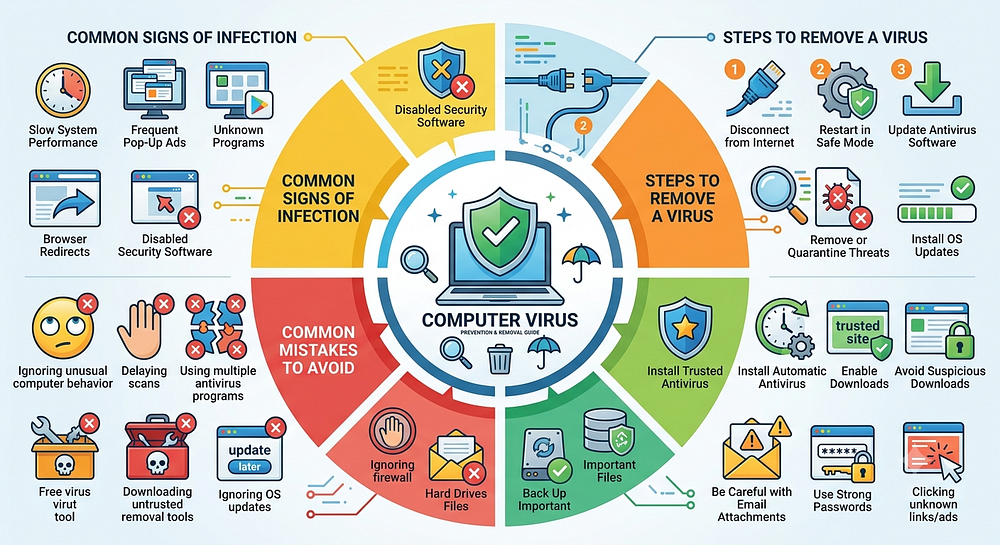
Common Signs Your Computer May Be Infected
Slow System Performance
If your computer suddenly becomes much slower than usual, malware could be consuming system resources in the background.
Frequent Pop-Up Advertisements
Unexpected pop-ups appearing repeatedly—even when your browser is closed—may indicate adware or other malicious software.
Unknown Programs
New applications or browser extensions that you don't remember installing can be signs of malware.
Browser Redirects
If your browser automatically opens unfamiliar websites or changes your homepage without permission, your system may be infected.
Disabled Security Software
Some malware attempts to disable antivirus protection or prevent security updates from installing.
Steps to Remove a Computer Virus
Disconnect from the Internet
Disconnecting your computer from the internet helps prevent malware from communicating with external servers or spreading across networks.
Restart in Safe Mode
Safe Mode starts your computer with only essential services, making it easier to detect and remove malicious software.
Update Your Antivirus Software
Before scanning, ensure your antivirus program has the latest virus definitions so it can detect newly discovered threats.
Perform a Full System Scan
Run a complete scan instead of a quick scan. A full scan checks every file, folder, and system location for malicious software.
Remove or Quarantine Threats
Allow your antivirus software to quarantine or delete any threats it identifies. Restart your computer if required.
Install Operating System Updates
Keeping Windows or macOS updated closes security vulnerabilities that malware often exploits.
How to Prevent Future Virus Infections
Install Trusted Antivirus Software
Choose reliable antivirus software and keep it updated regularly.
Enable Automatic Updates
Automatic updates ensure your operating system and applications receive important security patches.
Avoid Suspicious Downloads
Download software only from trusted developers and official websites.
Be Careful with Email Attachments
Never open attachments or click links from unknown or unexpected emails.
Use Strong Passwords
Strong, unique passwords combined with multi-factor authentication improve account security.
Back Up Important Files
Maintain regular backups so important data can be restored if malware damages your files.
Common Mistakes to Avoid
Many users accidentally make virus infections worse. Avoid these mistakes:
Ignoring unusual computer behavior.
Delaying antivirus scans.
Using multiple antivirus programs simultaneously.
Downloading free "virus removal" tools from unknown websites.
Disabling firewall or antivirus protection.
Ignoring operating system updates.
Clicking unknown links or advertisements.
Taking prompt action helps reduce the impact of malware and keeps your device more secure.
Best Practices for Long-Term Computer Security
Removing a virus is only one part of maintaining cybersecurity. Long-term protection depends on consistent security habits.
Keep your antivirus software active and updated, install software patches promptly, scan your computer regularly, and review security alerts. Avoid visiting suspicious websites, use secure Wi-Fi networks whenever possible, and regularly change important account passwords.
Educating yourself about common online scams and phishing attacks is equally important. Many modern malware infections begin with deceptive emails or fake websites designed to trick users into downloading malicious files.
Frequently Asked Questions (FAQs)
Can I remove a computer virus without antivirus software?
Some infections can be removed manually, but using reputable antivirus software is generally the safest and most effective approach.
How often should I scan my computer?
A full system scan once a week, along with continuous real-time protection, is recommended for most users.
Can a virus steal personal information?
Yes. Certain types of malware are designed to collect passwords, banking information, and other sensitive data.
Should I disconnect from the internet if I suspect a virus?
Yes. Disconnecting from the internet may help prevent malware from spreading or communicating with external servers.
Is updating Windows enough to prevent viruses?
No. Operating system updates improve security, but using trusted antivirus software and practicing safe browsing habits provide additional protection.
Conclusion
Computer viruses can affect system performance, compromise personal information, and disrupt daily activities if left untreated. Recognizing the warning signs early, using reliable antivirus software, performing regular system scans, and following safe online practices significantly reduce the risk of infection.
Maintaining updated software, avoiding suspicious downloads, backing up important data, and practicing good cybersecurity habits provide long-term protection against evolving online threats. With the right preventive measures and timely action, you can keep your computer secure, reliable, and running smoothly.


Comments
Post a Comment